Logging and Alerting on AitM Canary Token Hits in Microsoft Sentinel
Overview⌗
Adversary-in-the-Middle (AitM) proxy based phishing has historically been an effective method of bypassing basic authentication controls like SMS and TOTP MFA. Unlike credential phishing through a cloned login portal, an AitM attack proxies the legitimate authentication flow in real time and captures user session details, which an attacker can reuse without further user interaction.
The strongest preventative control is phishing-resistant multifactor authentication, like FIDO2 or passkey solutions. These are designed to prevent authentication from a different domain than the legitimate domain with which the hardware token or passkey was registered.
* Phishing-resistant multifactor authentication methods like FIDO2 security keys or passkeys mitigate this step (#2), unlike number-matching or TOTP methods that are not explicitly tied to the domain of the legitimate service.
For organizations that want additional defense-in-depth, deception technologies can provide a complementary layer by detecting proxied login portals and phishing infrastructure prior to credential compromise. Deception helps address the challenge presented by the fact that attacker infrastructure is not something that can be logged in a SIEM for alerting. Stolen session tokens can remain undetected until they are used against production systems; by then, detection depends on last-resort signals such as impossible travel or anomalous sign-in activity. Alerting on unexpected domains that use the same branding as a known login portal for your organization via deception technology gives advanced notice that allows for proactive network blocks and hunting for both traffic to and emails linking to a potential up-and-coming credential theft portal.
Canary Tokens⌗
Canary tokens are a form of deception technology that act as tripwires. Once they are accessed, they trigger a callback to a listening service, similar to a web beacon or email tracking pixel. Note that “canary token” is also the name of a canary token service operated by Thinkst Canary.
Thinkst Canary researchers developed a mechanism for detecting AitM phishing by using discrepancies in the referrer header of page loads between legitimate login portals and proxied login portals by using their canary token service. By loading a canary token via CSS, the canary listener can trigger an alert when the token is loaded with a referrer other than the legitimate portal.
Example HTTP request to a page containing a canary token, when the domain is the expected domain name:

When the the request is performed through a proxied portal, HTTP Referrer header mismatches (step #6):

Ingesting Canary Triggers into Sentinel with Azure Logic Apps⌗
While Thinkst Canary provides a notification mechanism to receive emails on cloned site visits, email isn’t conducive to proper case/incident management or alert tuning. Security teams can ingest these events into a SIEM where analytic rules can be tuned and incidents can be generated for assignment and remediation tracking.
Azure Logic Apps are a low-code/no-code, event-driven automation platform within Microsoft Azure. Logic Apps are an ideal candidate for this use case because Thinkst Canary tokens can be configured to send a webhook to any arbitrary URL, and Logic App workflows configured to receive an HTTP payload as a trigger can filter and transform the payload, then forward the resulting data to a Log Analytics workspace connected to Microsoft Sentinel.

A deployment template containing all necessary Azure resources is available here.
Deployment Instructions⌗
Azure⌗
Azure Portal:
Click the “Deploy to Azure” button, or download the ARM template from GitHub and navigate to the custom deployment service in the Azure Portal. Select “Build your own template in the editor” and upload the ARM template file.
Enter the name of your Microsoft Sentinel workspace in the “Workspace Name” field. Optionally, customize the names of the Data Collection Endpoint, Data Collection Rule, and Table Name for canary token events.
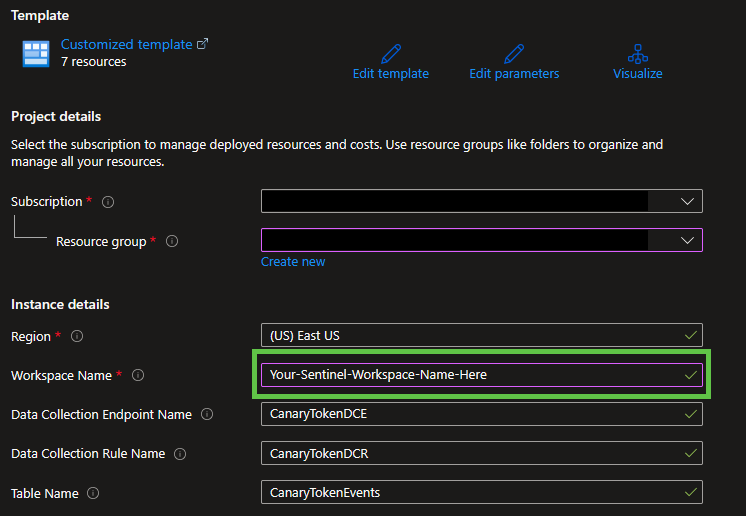
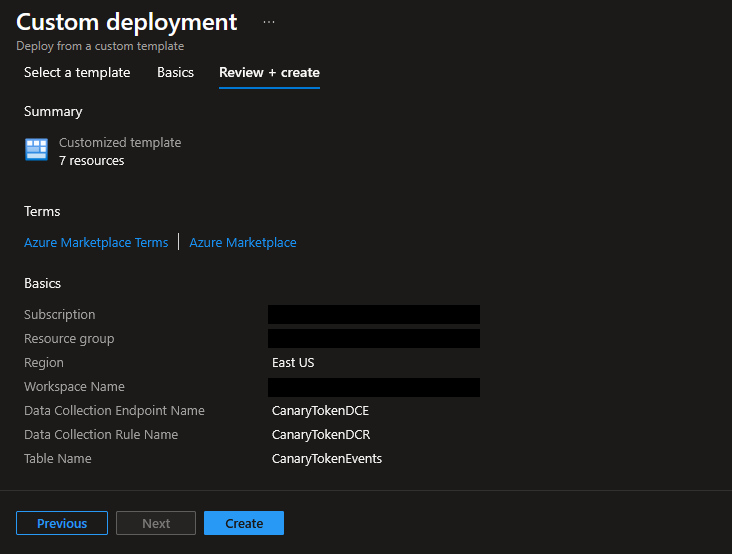
Click “Review + create” to validate, then “Create” to provision.
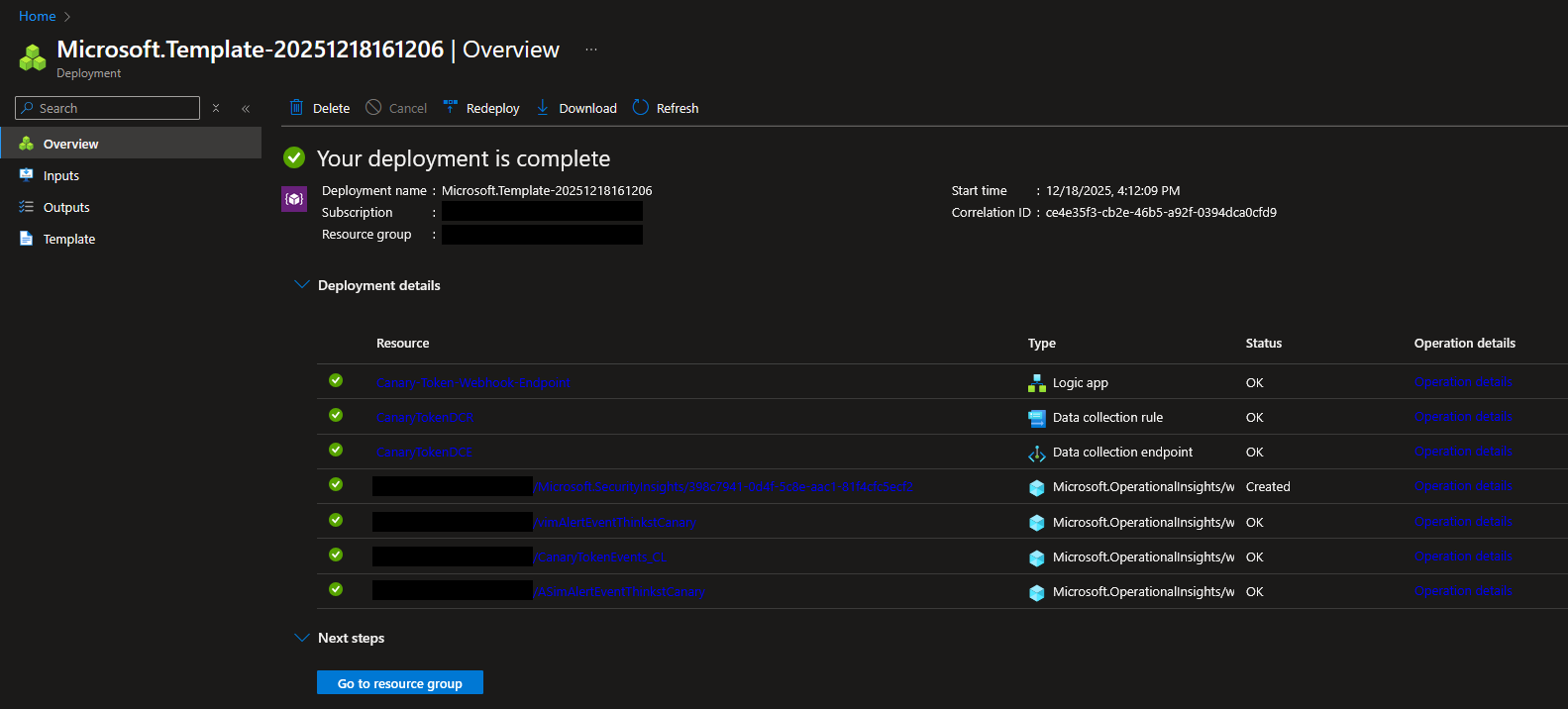
Upon successful deployment, the following resources are created:
Canary-Token-Webhook-Endpoint: The Logic App workflow with an HTTP Request trigger that receives canary token payloads.CanaryTokenDCE: The data collection endpointCanaryTokenDCR: The data collection ruleCanaryTokenEvents_CL: The Sentinel table where canary trigger events are logged.ASimAlertEventThinkstCanaryandvimAlertEventThinkstCanary: The Sentinel Workspace Functions that normalizeCanaryTokenEvents_CLevents to the ASIM Alert schema.ASimAlertEventThinkstCanaryacts as the base parser; vimAlertEventThinkstCanary provides additional parameters for improved filtering performance.workspace-name/Microsoft.SecurityInsights/generated-rule-guid: The Sentinel analytic rule titled “Canary Token Interaction” that generates alerts and Sentinel incidents when new canary trigger events occur.
AZ CLI:
az deployment group create \
    --resource-group Your-Resource-Group-Name-Here \
    --template-file azuredeploy.json \
    --parameters workspaceName=Your-Sentinel-Workspace-Name-Here
Granting the Logic App Access to Your Sentinel Workspace⌗
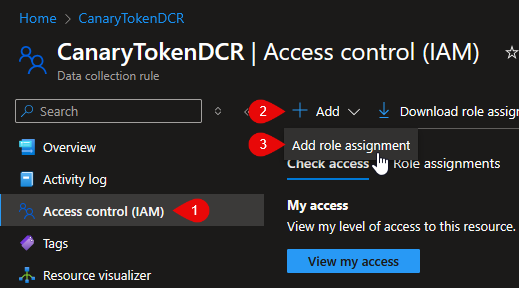
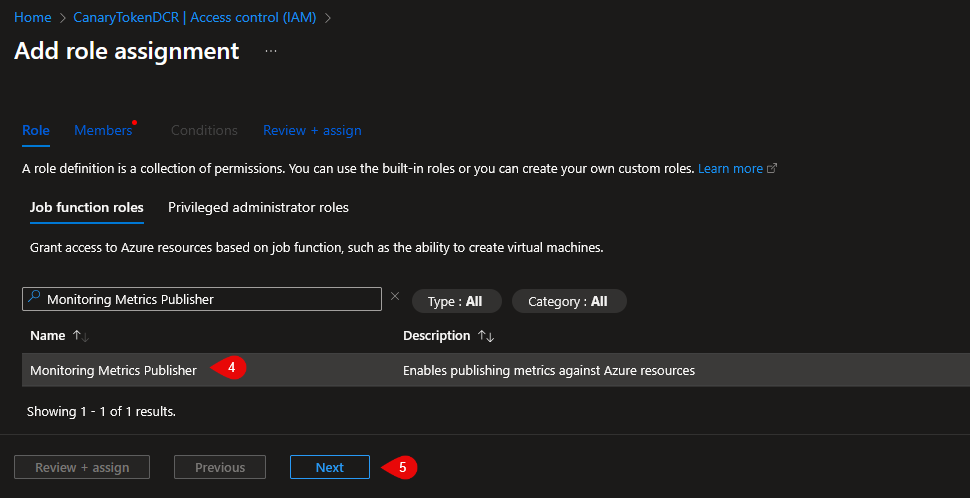
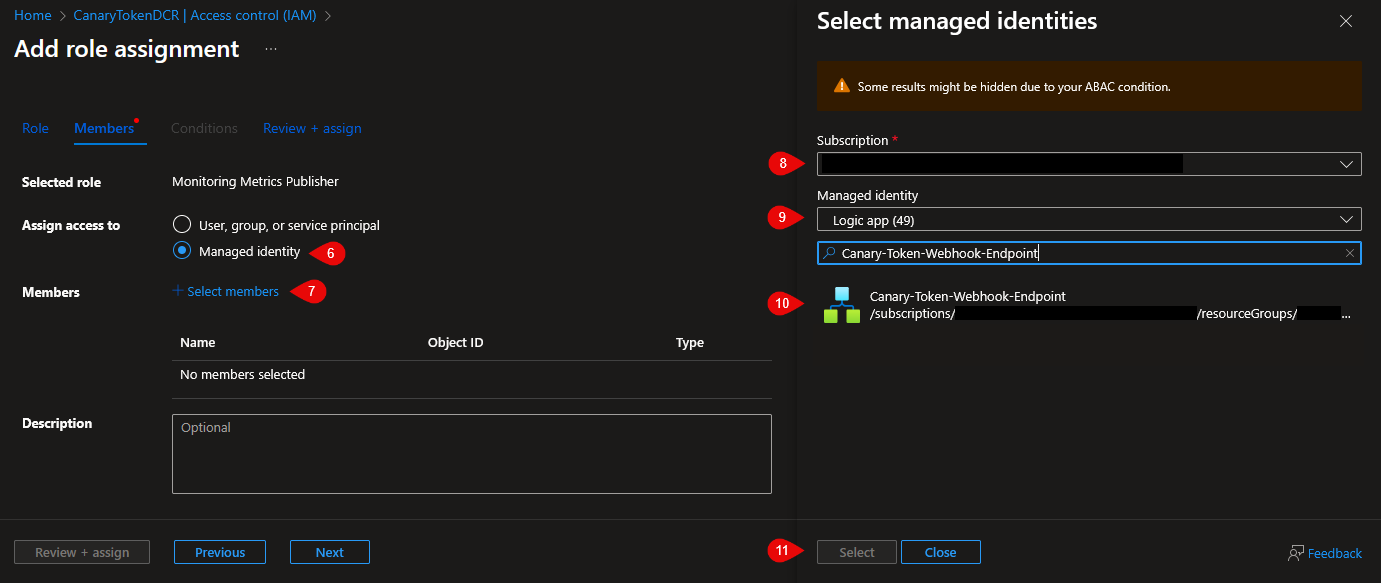
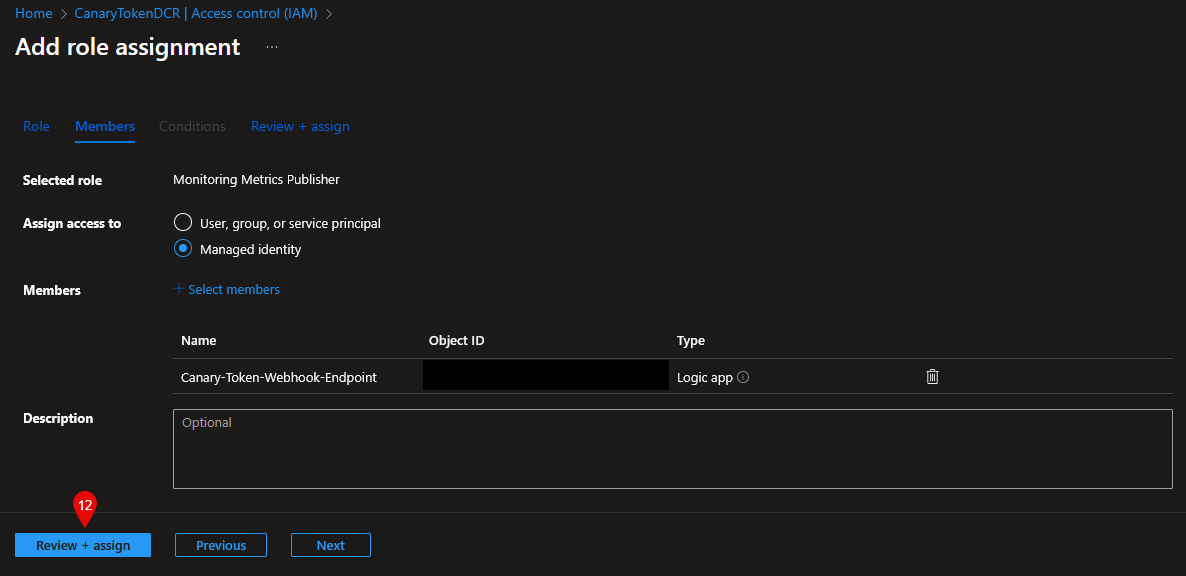
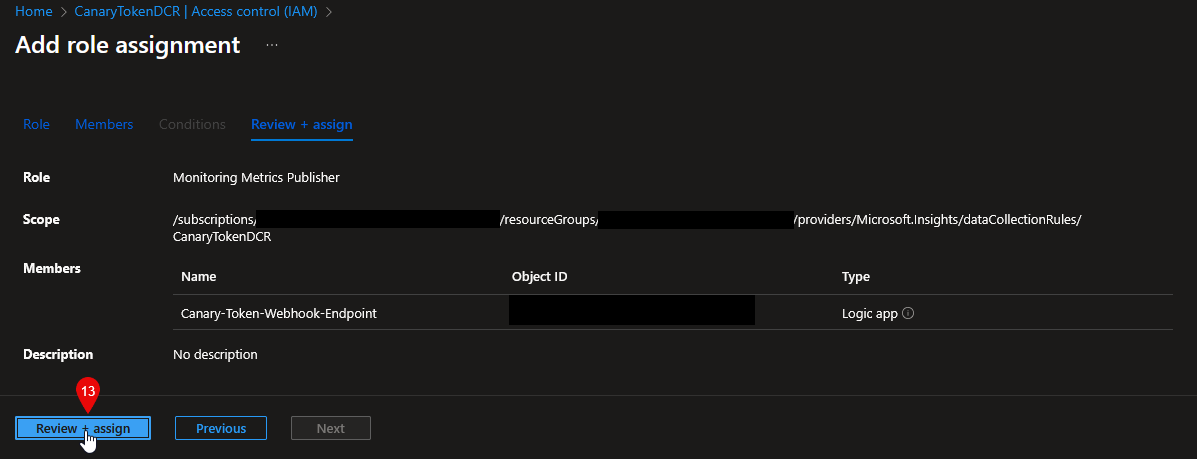
To allow the Logic App to write canary trigger events to the Sentinel workspace via the deployed Data Collection Endpoint (DCE)/Data Collection Rule (DCR), its system-assigned managed identity must be granted the “Monitoring Metrics Publisher” Azure role with a scope that includes the DCR.
Configuring a Canary Token⌗
Step 1: Retrieve the Logic App Webhook URL
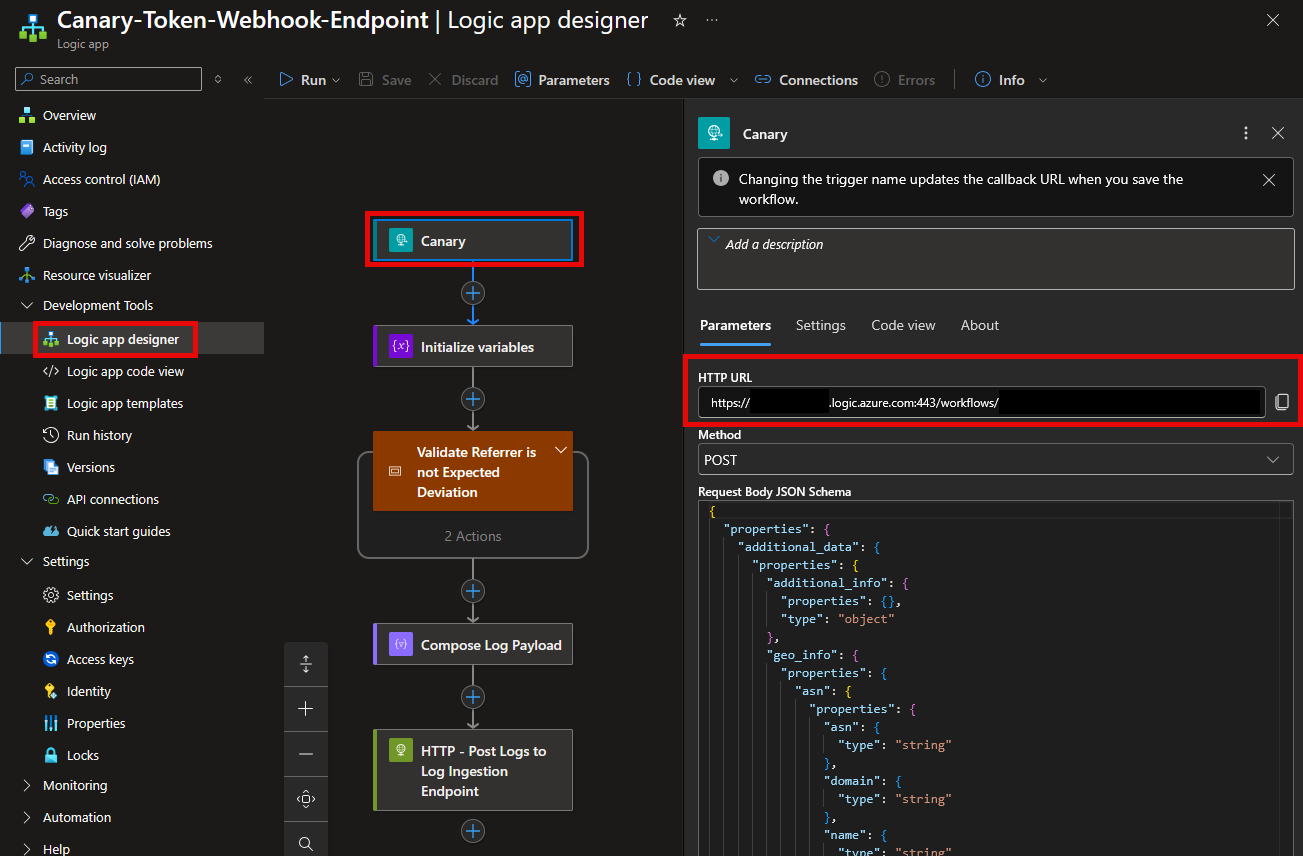
Open the “Canary-Token-Webhook-Endpoint” Logic App in the Logic App Designer. Click the “Canary” trigger and note the value in the “HTTP URL” field. HTTP POST requests sent to this URL will be processed by the workflow and written to the Sentinel table via the DCR.
Step 2: Create and Configure the Token
Visit https://canarytokens.org/nest/ and select the desired token type - for example, “Azure Entra ID login” for cloned Entra ID portals, or “CSS cloned website” for other identity providers such as Okta that support custom branding.
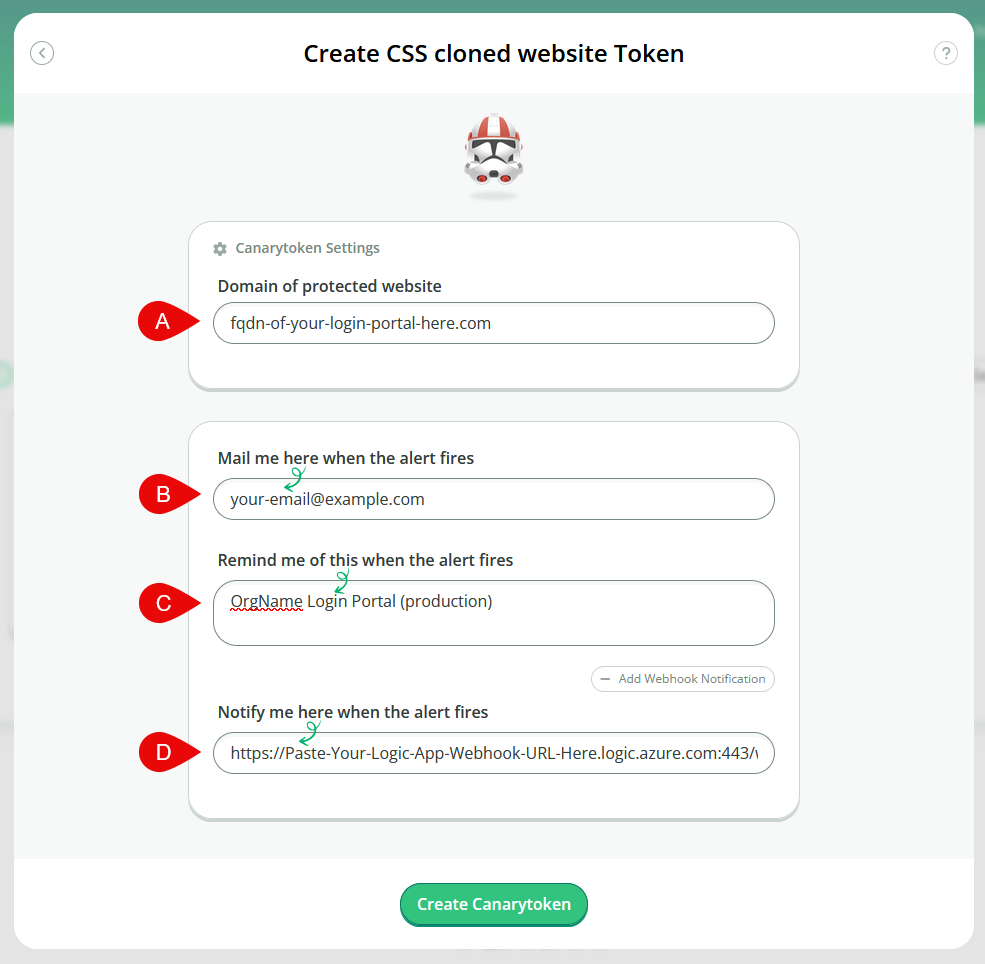
A. Enter the FQDN of the web resource to which the canary token will be added (e.g., login[.]your-organization[.]org). If multiple FQDNs require coverage, create a unique token per domain - reusing a token across domains will cause it to trigger on every visit to the second domain.
B. Enter an email address to receive alerts and manage the token.
C. Provide a descriptive label for the token to differentiate it in logs and alerts.
D. Paste the Logic App trigger URL. When the referrer domain does not match the expected domain from step A, a payload containing request details is sent to the webhook.
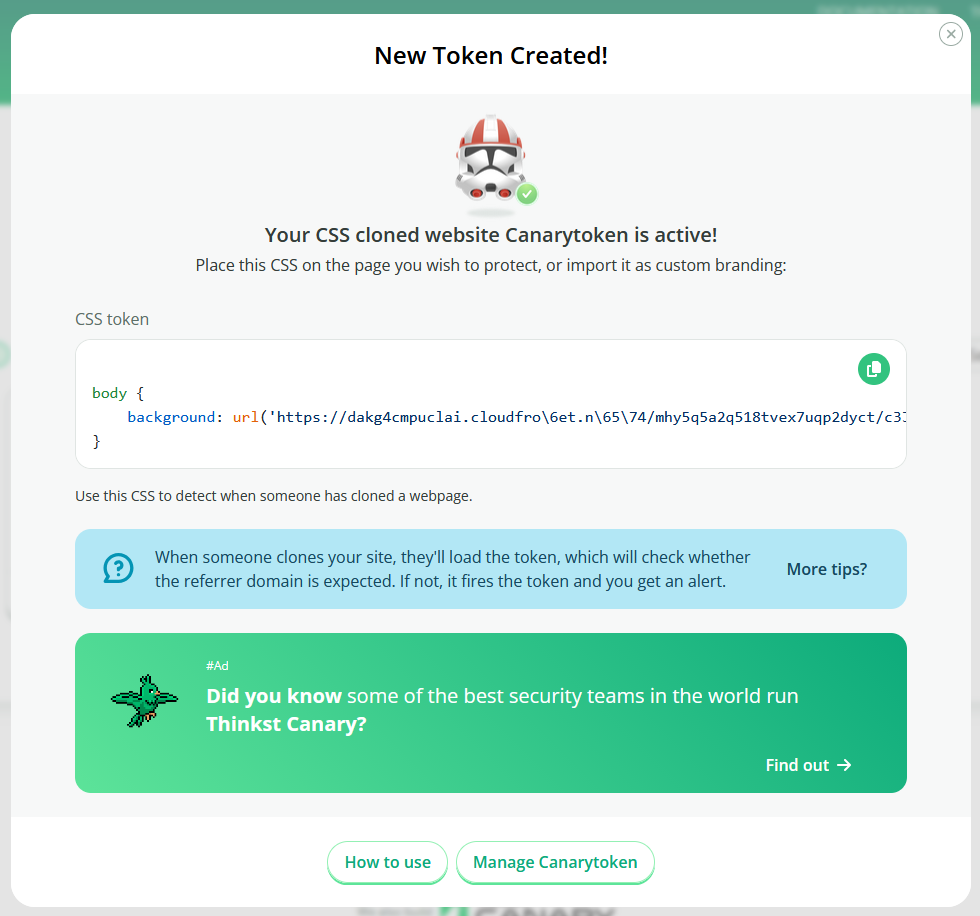
After completing the form, click “Create Canarytoken.” You will receive a CSS snippet to paste into the HTML or branding configuration of your web page or login portal. When this image is loaded from a non-matching referrer domain, the canary token webhook triggers and the event is logged in Sentinel.
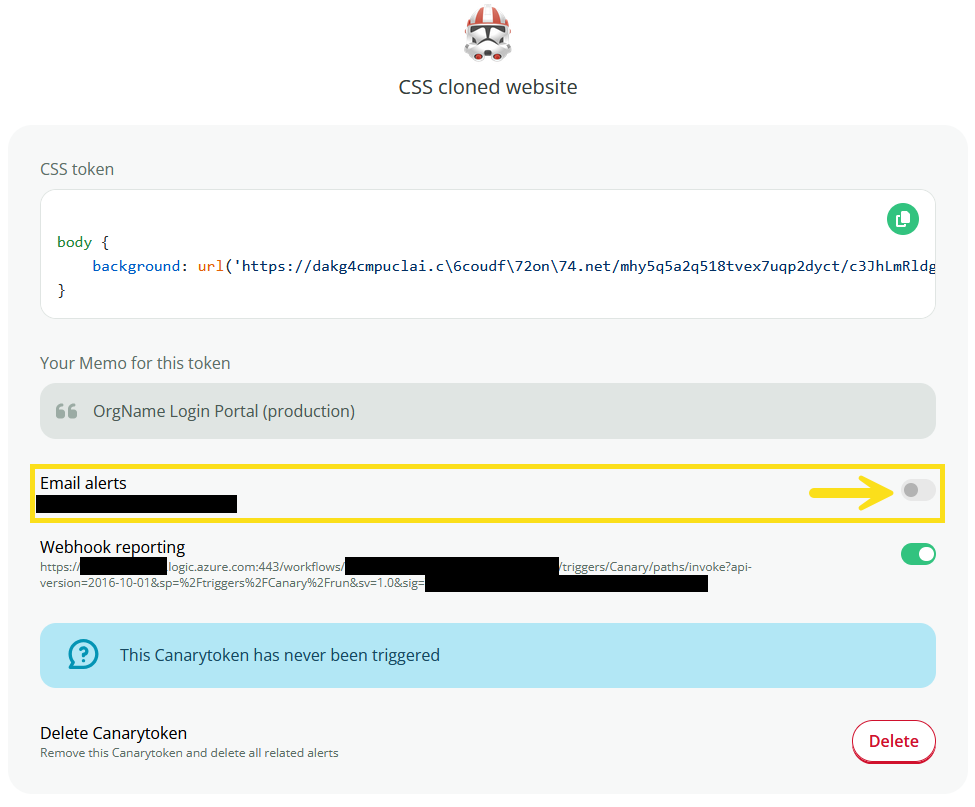
Optionally, email notifications for canary token triggers can be disabled if relying solely on Sentinel alerts via webhook ingestion.
Detection⌗
Once deployed, Canary Token triggers will send a payload via webhook to the Logic App, logging the payload in the Sentinel Log Analytics Workspace. The analytic rule will create an incident in Sentinel.
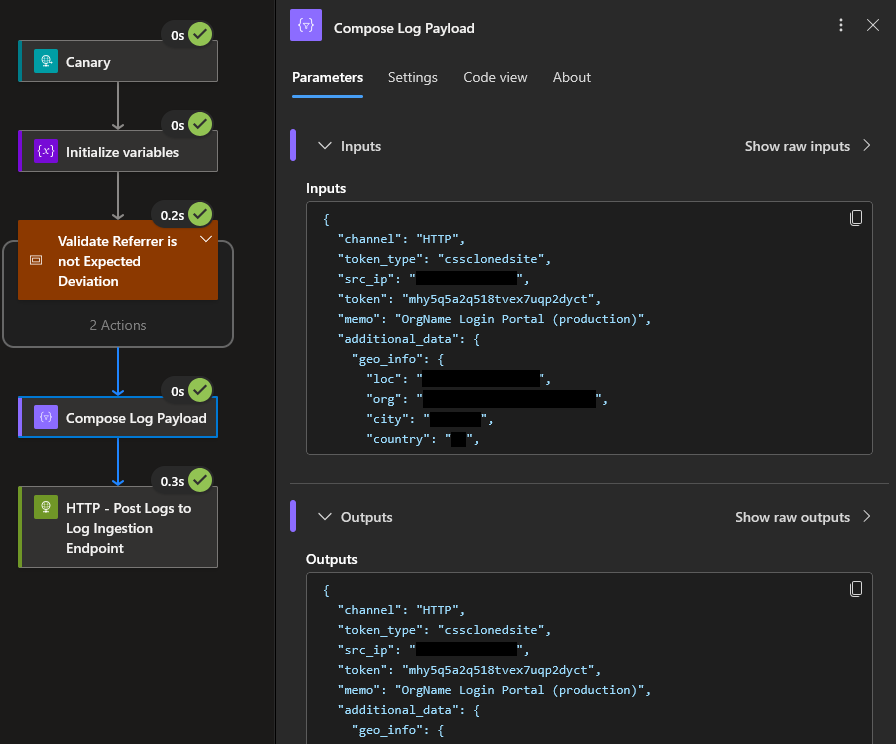
Logic App Workflow Run⌗
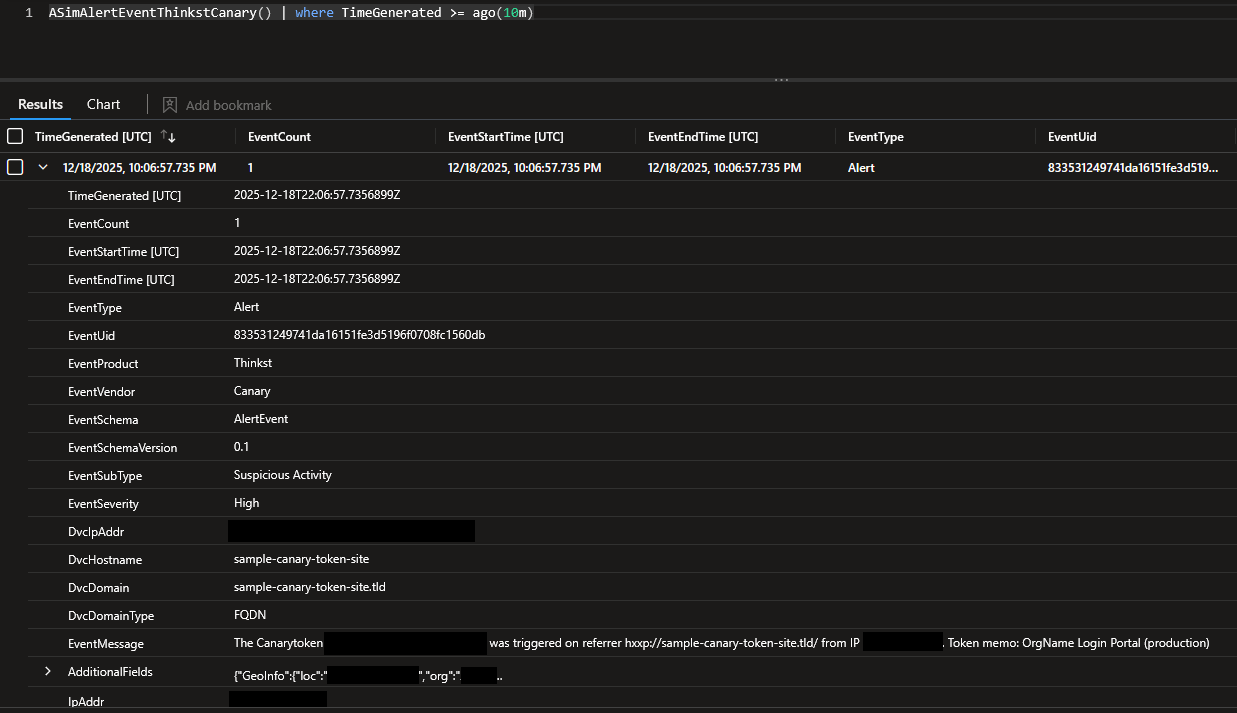
Sentinel Log (ASIM normalized)⌗
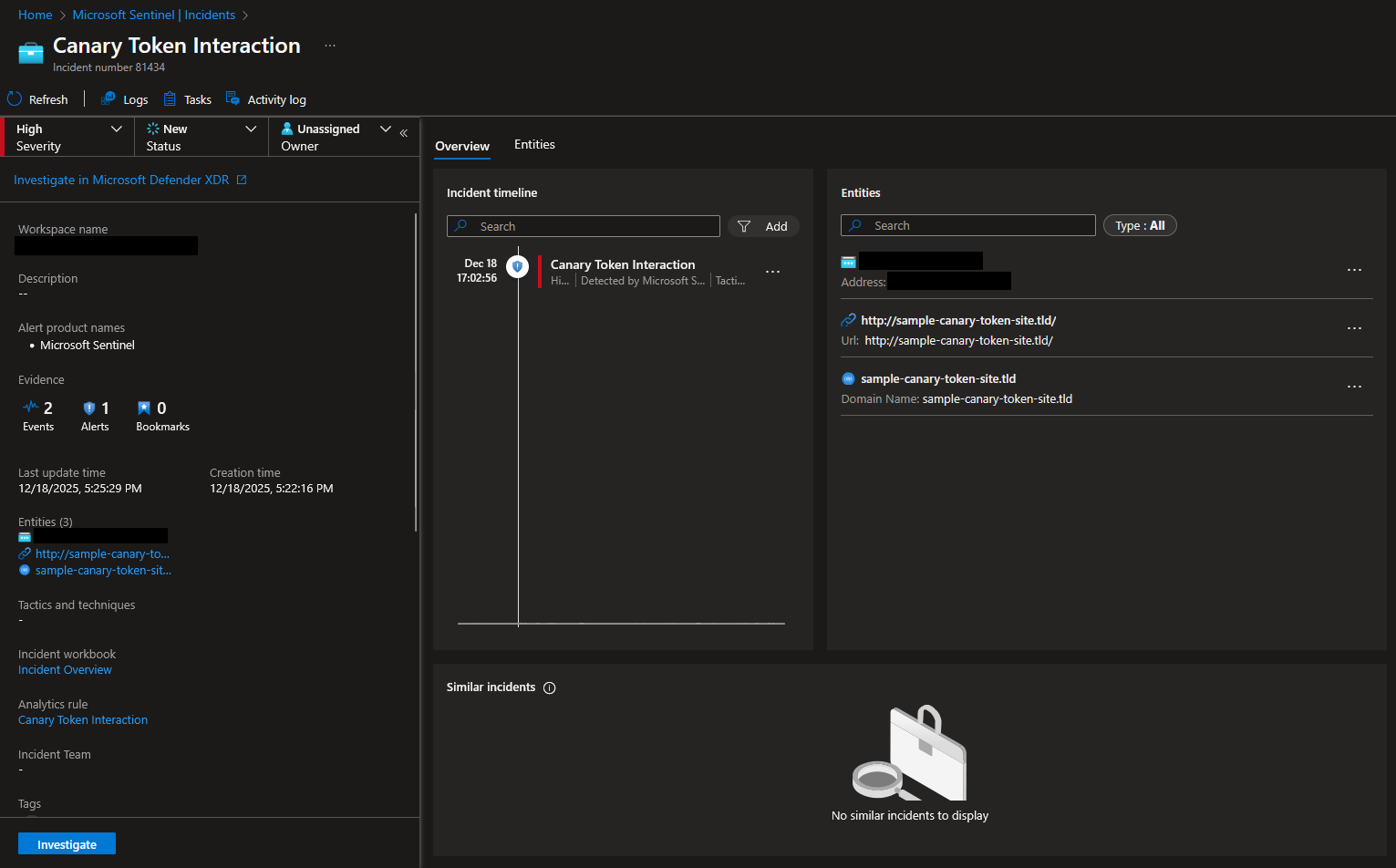
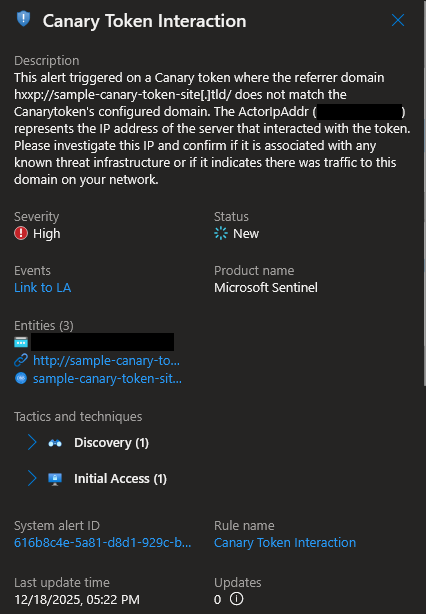
Sentinel Alert/Incident⌗
While phishing-resistant MFA remains the strongest defense against AitM attacks, deception can add valuable detection coverage when broader protections are still being rolled out. Integrating canary token hits into Microsoft Sentinel via Azure Logic Apps helps security teams strengthen defense-in-depth with earlier visibility and actionable alerts.